JavaScriptを使った画像置換
作ったサイトです。
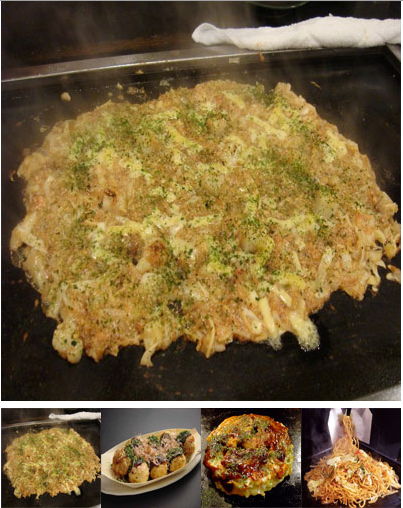
<!DOCTYPE HTML>
<html lang="ja">
<head>
<meta charset="utf-8">
<title>画像置換</title>
<style type="text/css">
<!--
* {
	margin:0;
	padding:0;
}

#wrapper {
	text-align:center;
	margin: 0;
}

-->
</style>
</head>
<body>
<div id="wrapper">
<p><img src="food01.jpg" width="400" height="400" name="bigImg"></p>
<p>
<img src="food01s.jpg" width="100" height="100" alt="" onMouseOver="document.bigImg.src='food01.jpg'"><img src="food02s.jpg" width="100" height="100" alt="" onMouseOver="document.bigImg.src='food02.jpg'"><img src="food03s.jpg" width="100" height="100" alt="" onMouseOver="document.bigImg.src='food03.jpg'"><img src="food04s.jpg" width="100" height="100" alt="" onMouseOver="document.bigImg.src='food04.jpg'">
</p>
</div>

</body>
</html>
メニュー画面作成

メニュー画面の1部を作りました。
あまりくどくならないように作るのが難しい。
もうちょっと修正を加えながら完成させていけたらいいと思います。
form設定

論理がまだいまいち理解できてないのでモヤモヤ感が残っている。
<?xml versin="1.0"encoding="UTF-8"?>
<!DOCTYPE html PUBLIC"-//W3C//DTD XHTML1.0 Srict//EN""http://www.w3.org/TR/xhtml1/DTD/xhtml1-strict.dtd">
<html xmlns="http://www.w3.org/1999/xhtml"xml:lang="ja"lang="ja">
<head>
<meta http-equiv="Content-Type"content="text/html;charset=UTF-8">
<meta http-equiv="Content-Style-Type"content="text/css">
<title>form-simple(1)</title>
<style type="text/css">
<!--
#myform {
    width:500px;
}
#myform label {
    font-size: 0.875em;
}
#myform table {
    font-size:0.875em;
    width:100%;
    border-collapse:collapse;
}

#myform th {
    text-align:left;
    width:100px;
    padding:8px;
    background-color: greenyellow;
    border:solid 1px #aaaaaa;
}
#myform td {
    border:solid 1px #aaaaaa;
    padding:8px;
}
#myform p {
    text-align:center;
}
-->
</style>
</head>
<body>
<form method="post" action="#" id="myform">
<table>
<tr>
<th><label for="user">名前</label></th>
<td><input tyoe="text" id="user" name="username"/></td>
</tr>
<tr>
<th><label for="mail">メールアドレス</label></th>
<td><input type="text" id="mail" name="mailaddress"/></td>
</tr>
<tr>
<th><label for="com">コメント</label></th>
<td><textarea id="com" name="comment" cols="40" rows="8"></textarea></td>
</tr>
</table>
<p><input type="submit" value="送信" id="submit"/></p>
</form>
</body>
</html>
Positionで作るCSS

制作時間40分
だいぶ時間がかかってしまった。
<?xml version="1.0" encoding="UTF-8"?>
<!DOCTYPE html PUBLIC"-//W3C//DTD XHTML1.0Strict//EN""http://www.w3.org/TR/xhtml1/DTD/xhtml1-strict.dtd">
<html xmlns="http://www.w3.org/1999/xhtml"xml:lang="ja"lang="ja">
<head>
<meta http-equiv="Content-Type"content="text/html;charset=utf-8"/>
<meta http-equiv="Content-Style-Type"content="text/css"/>
<title>両側を跨ぐフッターを配置する</title>
<style type="text/css">
<!--
body {
    text-align: center;
}
#container {
    width: 760px;
    margin: 0 auto;
    text-align:left;
    background-color: #123456;
}
#header {
    background-color: #DDDDDD;
    height: 50px;
}
#wrapper {
    position:relative;
    margin: 10px 0;
    background-color: #654321;
    width: 100%;
}
#primary {
    margin-left:210px;
    width: 550px;
    background-color: #C7D5ED;
}
#secondary {
    position:absolute;
    left: 0px;
    top: 0px;
    width:200px;
    background-color: #F9CFBA;
}
#footer {
    background-color:  #7865AA;
    height: 50px;
}
-->
</style>
</head>
<body>
<div id="container">
 <div id="header"><br/></div>
 <div id="wrapper">
  <div id="primary"><br/><br/><br/><br/><br/><br/><br/><br/><br/></div>
  <div id="secondary"><br/><br/><br/><br/><br/><br/><br/><br/><br/></div>
 </div>
 <div id="footer"><br/></div>
</div>
</body>
</html>
